Step 6: Column Score Ranges
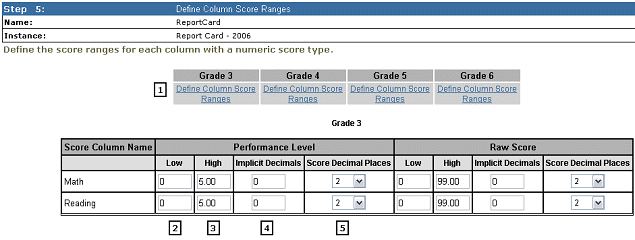
The Column Score ranges will set the high and low score range for each column and the number of decimal places displayed in the Baseline Report.
1. Use the "Define Column Score Ranges" link to add score ranges for each grade level
2. Enter the value for the low score
3. Enter the value for the high score
4. If the data file contains implicit decimals enter the number of implicit decimals. e.g. One implicit decimal place: 40 = 4
Enter the number of decimal places that you want displayed on the Baseline Report
Note that score ranges may descend; for example, a score may have a range of 16 to 10. This may be used when having a low score value is superior to a high score value (think of the game of golf!).